I hope everyone is staying safe, dry, and warm with the snow and ice we have been having. We have had a lot of great changes and updates to the space recently. The HVAC was installed in December in the lower building in Purcellville. We received a directed donation to get a larger Bambu Lab 3D printer set up near the ceramics department. There will be a variety of ceramics classes for all skill levels coming up with the assistance of Glenda Skelley, Amy Berringer and others. These are on temporary hold while we await the new/repaired roof thanks to the town of Purcellville! Please watch for updates as the replacement may have a strong impact on the space for a short period of time.
We have made strides on restructuring the payment system and fees for consumables and machine use time, though the final plan has not been finalized. Our IT Steward, Rob Donanhue has been working really hard on replacing and upgrading our systems including computers, programs, door systems, and more. Our new 3D printing steward, Bryan Daniels, is tackling new projects and clearing out our older FDM printers. Watch for him getting his first proposal together to recommend a few more printers in the space. The printers have been very popular!
While the vote for a new board member did not get any nominations, and is getting postpone to the yearly changeover. I would like to personally thank Scott Silvers for all the work he has done over the years. He has been a pleasure to work with as a BOD member, IT steward, and 3D printing steward. While he has taken a step back from some of these responsibilities, it is important to recognize how much work he has done to shape our institution. Thank You from the Membership.
I’m sure I will think of 100 other things I would like to point out as soon as this email is sent, but I just want to remind everyone that every bit of volunteer work helps, and that everyone here is important to the space. Please continue to Make, Learn, and Grow with us.
Thanks,
Diane Bollinger
Makersmith’s President
The Treasurer is looking for volunteers who are interested in tracking and calculating payments and writing financial policies and procedures. Please contact Mary Waldron via Slack or respond by email to treasurer@makersmiths.org.
Computer Upgrades Complete in Laser and 3D Printer Rooms
Rob Donahue
The IT Committee has completed a series of computer replacements to improve our equipment workstations.
Laser Cutter Room: A new computer has been installed and configured with all necessary laser cutting software.
3D Printer Room: The previous laser cutter computer has been relocated to the 3D printer room as an additional workstation, complete with its own monitor, keyboard, and mouse. Both the new and original 3D printing computers are now available for member use.
Important Reminder
Both 3D printing computers will remain operational through February 21st. If you have personal files on the original 3D printer computer, please transfer them to the shared storage drive (Z: drive) before that date. This transition period also allows 3D printer stewards time to migrate any custom settings to the new system.
Questions about these upgrades? Contact Rob or post in the IT Committee channel.
~~~~~~~~~~~~~
Door Lock Auto-Lock Feature Activated
Effective February 1, 2026, the August door locks at both Leesburg and Purcellville locations are now configured to automatically lock after 30 minutes of inactivity.
Important: Always bring your phone with you when leaving the building to ensure you can regain entry using the August app.
Questions or feedback? Please share them in the #general channel on Slack.
Makersmiths’ Chilli Challenge John Carter
To coincide with February's Leesburg Work Party on Saturday 28, we'll be hosting our Chili Challenge from 1pm-3pm. Roll by in the morning to help knock out our monthly chores or just drop in the afternoon for a bowl or two. All chilis and heat levels are welcome. We'll take your side dish too! We've already got returning chiliheads, Jim Waldron and Squirrl, so I'll be making a small batch and Ken Fuenticella is going to hit us up with his "who needs a recipe?!" madness. Come share yours or partake of ours and shoot the shade!
The NoVA Creative Reuse Center
Kayl Martin
The NoVA Creative Reuse Center is just a couple blocks away from MSL. It is a great place to find art supplies. It has a collection of different things for very cheap and you keep items from being thrown into the landfill. I found fabrics, beads, paints, stamps, shells etc. If you are looking for something specific, they have a contact list that they can help you source what you need. They also take donations. For all of us who are holding on to items because we don't want to just throw them away, it is a great place to go. They take donations on Tuesdays, but like Makersmiths, they can't take all donations, so ask first. Take a look at their website for location and hours https://www.novacrc.org/ or give them a call at 571-416-7050.
The HIVE, The Hub for Innovators, Veterans and Entrepreneurs
Are you a veteran maker from the Shenandoah Valley? The Hub for Innovators, Veterans and Entrepreneurs (HIVE) is hosting its first Veteran Networking Event on Friday, Feb. 20, 2026 from 5-7 p.m. at Shenandoah University’s Hazel-Pruitt Armory, Collaboratory, to build stronger connections for those who have served. The event is designed to connect veteran service organizations with veterans across the Shenandoah Valley, creating space for meaningful conversation, resource sharing and community building. Attendees are encouraged to RSVP and share the registration link within their networks to help strengthen these connections. Register online using Eventbrite. Questions? Contact Patricia Young at pyoung1@su.edu
Virginia Commission for the Arts Creative Communities Grant
Are you interested in securing a grant for Makersmiths? Local non-profit arts organizations are invited to submit requests for funding to the Purcellville Arts Council to be considered for inclusion in the Town’s proposal for the Virginia Commission for the Arts (VCA) Creative Communities Partnership Grant Program. We need to apply online by March 2, 2026. Please contact James.Waldron@makersmiths.org who is the chairperson of the grants committee if you are willing to work with the committee to write a grant proposal.
Marketing Opportunities for Makersmiths 2026
Purcellville Parks and Recreation and the Purcellville Arts Council shared with us opportunities in 2026 for artists and art organizations to be featured! Here are some volunteer opportunities that will help spread the word about Makersmiths but also give you opportunities to enjoy community events in Western Loudoun. If you have any questions about the following opportunities, contact Amie Ware, the Parks and Recreation Division Manager for the Town of Purcellville: aware@purcellvilleva.gov
Purcellville Music and Arts Festival! April 25, 2026 from noon to 7 p.m.
Be part of the art show inside the Bush Tabernacle at the annual Purcellville Music and Arts Festival! This festival features 4 stages, artists, vendors and activities inside the Bush Tabernacle and in Fireman’s Field Park. We need someone to head a booth at this event for Makersmiths and we need to apply online by April 6, 2026. Please let Diane.Bollinger@makersmiths.org know if you are interested.
Purcellville Wine and Food Festival – Arts in the Garden
July 18, 2026 from 2 to 8 p.m.
Dillon’s Woods (next to Fireman’s Field)
Show attendees of the Purcellville Wine and Food Festival how you create your works for art. We need someone from Makersmiths to head a booth at this event. We need to apply online by July 3, 2026. Please let Diane.Bollinger@makersmiths.org know if you are interested.
Purcellville Artisan Tour
November 7 and 8, 2026 10AM-5PM
Makersmiths Purcellville- Lower Building
We will open our ceramics, glass-cutting, blacksmithing and laser cutter/fiber laser spaces to show (and sell) members’ artwork. Diane Painter will head this event for Makersmiths.. Please let diane.painter@makersmiths.org know if you want to show and/or sell your paintings, ceramics, blacksmithing, stain glass, laser cut or other art pieces in this artisan tour. We need to apply online by June 30, 2026.
Finishing a Ceramic Piece
Kelly Zaiko
There are many creative decisions involved in finishing a ceramic piece—from forming and trimming the clay to adding decorative details and choosing a glaze. Sometimes a project calls for a playful, less predictable surface. One of my favorite ways to add color and whimsy is by using glaze chips.
Glaze chips are simply dried pieces of glaze. You can deliberately dry glaze on a surface like parchment paper and collect and break apart those chips which allows you to plan the glaze chip colors used on your project. I simply gather the pieces that flake from my glaze containers and save them. By combining multiple types of chips together the outcome is less predictable since the chips are of all different colors. Before using your glaze chips, consider the size of the chips and if you want the pops of color on your piece to be more uniform in size or random. You can break apart some of the bigger glaze chips into smaller pieces. Remember that big chunks of glaze are like heavy applications of glaze and can run.
I prefer to do glaze chip projects on smooth, speckled-free, white stoneware so that the colors pop. For the base glaze I use a white glossy glaze, but a clear glaze would work as well. The final coat of glaze is where the glaze chips come into play. As you brush or dip the final coat of glaze, quickly sprinkle the chips on the wet glaze, working in sections, if possible, to prevent the glaze from drying before the chips are applied. To prevent contaminating your entire container of glaze with chips, pour some glaze into a separate container before starting the final coat so you do not introduce glaze chips into your glaze container.
One final consideration: glaze chips can sometimes fall off before firing. Take care to prevent loose chips from landing on other work or kiln shelves. When dropping your piece off for firing, be sure you bring a cookie, which is like a clay coaster, to put your piece on while it waits to be fired. This will prevent your glaze chips from dropping on other projects or the kiln shelf. The hardest part about this project is waiting for the kiln to cool so you can see how your project turned out! Be sure to share pictures of your finished projects on the ceramics Slack page! Let me know if you have any questions by sending a direct message to me on Slack!
ROS Simulation Environment for the TurtleBot 3
Jeff Irland
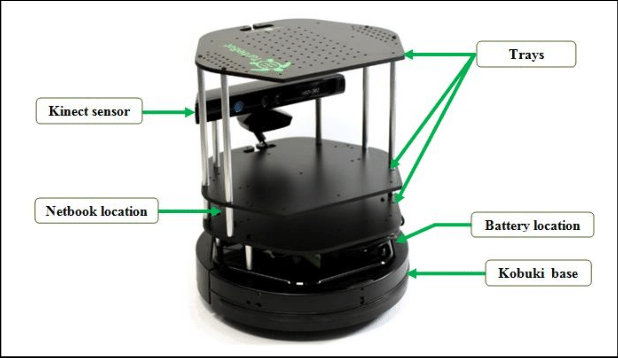
When I first joined MakerSmiths in October, I spotted a TurtleBot 3 on the shelf of the Electronics, AI, & Cloud Night meeting room. First sold in 2017, it is (or should I say it was?) a popular training tool for robotics & the Robot Operating System (ROS). I'm not sure what shape the TurtleBot is in but I think it might be in working order and could be set in motion once again.
I'm in the process of developing my ROS development skills and plan to establish a ROS simulation environment for the TurleBot 3. This simulation environment will help me exercise my ROS skills for a bigger thing I wish to do, but I can also use it to breathe life back into this lonely old TurtleBot. There is a great deal of open-source documentation and software for the TurtleBot, so building the simulation/development environment will be successful, but will it bring life to the hardware is a question. Anyone interested in helping this this task? Please let me know. See TurtleBot 3- ROBOTSL Your Guide to the World of Robotics and TurtleBot3 37 Gazebo TuSimulation Tutorial
Learn the History of TurtleBot 3. What’s With the Name?
Jeff Irland
Oddly, turtles, robots, neurophysiology, and children's toys/education have an entangled history.
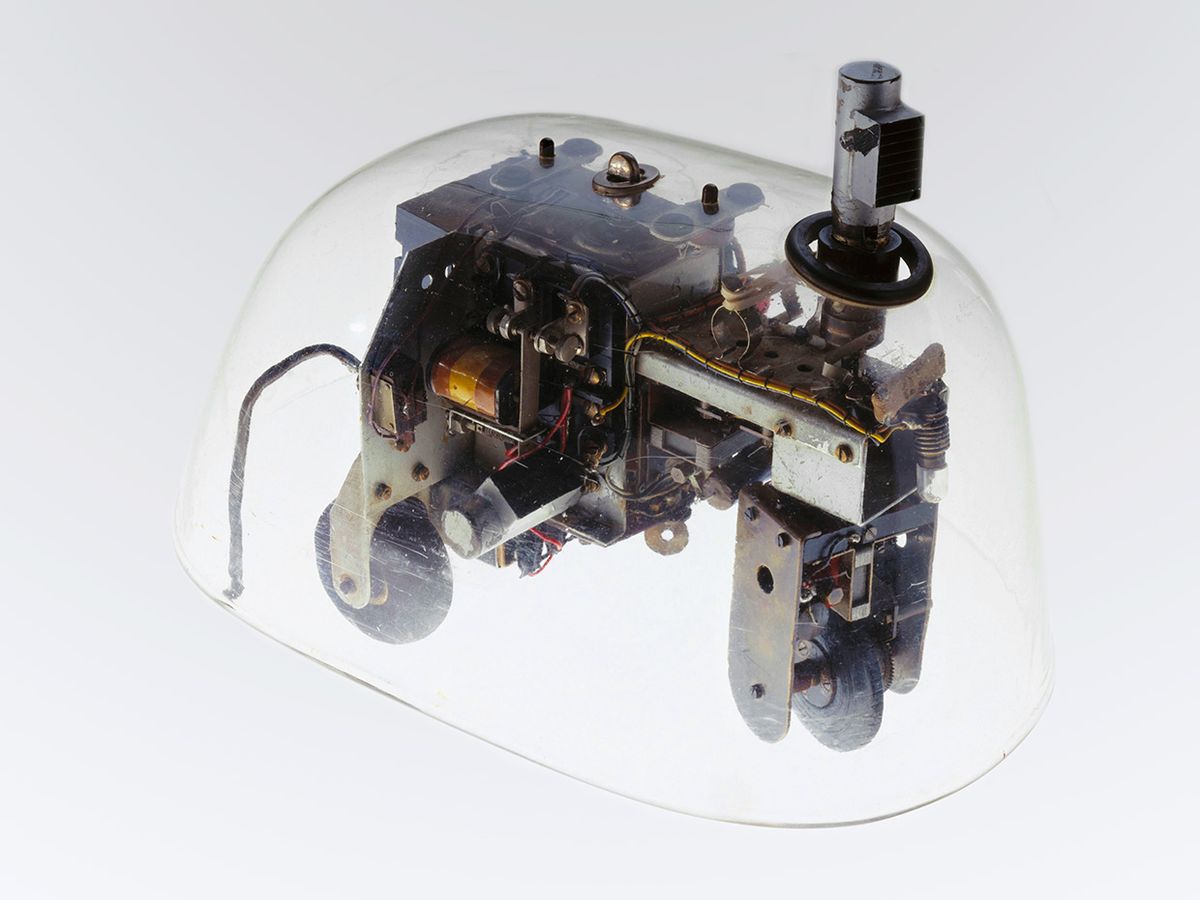
It starts in the late 1940s, when two research devices, named Elmer & Elsie or "tortoises" as they were collectively called, were created to explore the operation of neurological systems in animals. The researcher was William Grey Walter, and he wanted to test his theory that a minimum number of brain cells could control complex behavior and choice. His first tortoises started with a single light and touch sensor hooked up to two different paths that ran two different motors acting as two separate neuron brains. Walter said his tortoises explored their environment actively, persistently, and systematically, as most animals do, and he argued that this behavior was evidence of machine self-awareness. And you thought that the machine self-awareness debate started with ChatGPT!
Time marches on to 2006 when Willow Garage was created as a robotics research lab and technology incubator devoted to developing hardware and open source software for personal robotics applications. Willow Garage's first major robot was called PR2 (Personal Robot 2), but the company was best known for its open source software suite Robot Operating System (ROS), which rapidly became a common, standard tool among robotics researchers upon its initial release in 2010.
But PR2 had a problem... It was very expensive at $400K. The TurtleBot was created in 2010 by Willow Garage and became a standard in robotics education and research, providing similar capabilities to larger robots like the PR2, but at a fraction of the cost ($1.3K, though you had to supply a laptop and battery). The TurtleBot, along with its robotics platform ROS, enabled a generation of students studying robotics to perform complex tasks such as Simultaneous Localization and Mapping (SLAM) and 3D object detection (OD). SLAM is about knowing where you are located relative to "things" in your space, and OD is about distinguishing one "thing" in your space from another. Autonomous, purposeful, unobstructive movement is what makes something a true robot, unlike Walter's tortoises Elmer & Elsie.
Willow Garage closed down in 2014. Today, TurtleBot is a licensed trademark that is maintained by Open Robotics (a nonprofit corporation), and Open Robotics also owns and maintains ROS. ROS remains today the most popular robotics platform for research and industrial use, and the TurtleBot is widely used as an academic teaching and research tool around the world.
So, when the topic of "turtles" comes up when discussing robotics education, or children's toys, or computer graphics, or neurological systems... Don't be surprised. You now know that the turtle's natural habitat is among robots.
2012 (TurtleBot 2): Clearpath Robotics unveiled at ROSCon, featuring the Kobuki base for better mobility, payload capacity, and self-charging.
2017 (TurtleBot 3): Introduced by ROBOTIS in collaboration with Open Robotics. It featured a smaller, modular design (Burger/Waffle) using Raspberry Pi instead of a laptop and 360-degree LiDAR instead of Kinect.
2022 (TurtleBot 4): Launched by Clearpath Robotics, featuring a robust, intelligent platform with built-in sensors.
Our Makersmiths KidWind wind and solar teams were supposed to go to GMU’s Fuse Center for KidWind Expo 2026 on January 31 to learn new knowledge and skills for their projects. But with the Nor’easter approaching the coast, some of the presenters were unable to attend the scheduled in-person event. So, KidWind turned it into a virtual event. Our high school solar team participants Max Burrus, Soren Ogelman, Zara Ramadan, Jocelyn Ro and Zayyan Masud served on a panel and presented through ZOOM their experiences with KidWind over the years. I was delighted to see Virginia elementary school students online asking the panelists great questions, such as “What was your most memorable time in KidWind?” Zara said she loves completing knowledge quizzes with teammates during regional challenges. Soren shared a time when something went wrong with the team’s solar project. An alarm operated by a microcontroller went off in their project. They had just a few minutes to troubleshoot the problem before meeting with the solar judges. Apparently, it was a very stressful situation, but Soren felt it was an invaluable experience, working with his teammates to quickly figure out how to fix the situation.
During the early morning that day. our middle school solar team met at Makersmiths Leesburg to learn from renewable energy workers the many different career opportunities that exist. The rest of the time that day, the solar team worked on their KidWind project. Our elementary and middle school wind teams met at my house to learn how to assemble gear-driven nacelles and test their initial set of blades that they made the previous week. We also had lunch together, so it was nice for the two teams to get to know each other in a social setting. We are glad the Nor’easter did not make it as far north as Loudoun County because we certainly had a productive day!
Whatcha Make Today?
Herb Regensburger’s first attempt at a zero-wheel drive, dual dually, articulating dachshund.
Kristina Rall had a client who wanted a wooden tray with a place for a White Claw can, another for a whiskey tumbler, and an insert for an iPad. Here is what she created! Notice how the grain patterns line up in a way that resemble a horizon?
Mark Dilallo made hats, magnets and sweatshirts for Hope & Serenity Farm Sanctuary and LiftMeUp.org. What a wonderful way to support others!
Diane Bollinger made two Cosplay costumes for herself and her husband for Magfest! Not only did they enjoy their time at the festival, they had opportunities to tell other festival goers about Makersmiths!
Fixing Photos Using CANVA
Diane Painter
One of my favorite maker websites is Jennymaker.com. This month, Jenny Maker teaches us how to use Canva photo editing to transform everyday pictures into craft-ready images! She references fixing a photo for making a custom puzzle or to create a set of matching coasters, perfect for our members using a variety of tools at Makersmiths! For step-by-step videos, subscribe for FREE at http://bit.ly/sub2jennifer.
Makersmiths has a CANVA Pro account for members who want to use the pro account for marketing, website or newsletter purposes. Please contact me if you are willing to help us with those initiatives and use CANVA to do so. Email diane.painter@makersmiths.org or direct message me in SLACK.
Secretary Report
James Waldron
The Board of Directors met On January 28th in the basement at Leesburg and online. The meeting was called to order by the Chairman at 7:00 PM.
Brian Daniels was appointed as a Co-Steward for 3D printing. Congratulations Brian !
No nominations were received for the Open Director seat and there is not enough cycle time remaining before our Annual Meeting and the regular director elections to run another empty seat election round. There were three Consent in Lieu items approved by the board in January. One was to start an application for tax exempt status, another was to accept a $1500 directed donation, and the last was to increase the IT budget by $209 for Lightburn and Chitubox box licenses.
The Treasurer present the December and end of year financial reports. We ended the year in excellent financial shape due mostly to a reduction in our expected monthly expenses. In 2025 the Treasurer processed over 5000 transactions, and 143 checks (most of the bill we pay are done by automatic transfer). More details of the Financials are posted on the wiki with the minutes of the board meeting. Our membership currently stands right at 300 members.
Motions Considered at the meeting included a possible revision of our fee schedule, executing a CPA agreement for our tax filings, issuing debit cards to our facility stewards, authorization to purchase a new plotter for Purcellville, and an accountant agreement.
The meeting was adjourned at 9:24.
Red Tool Classes are an important step in your Maker journey!
MS-L
MS-P
February 11 MWP-R100: Metal-working Basics Red Tool
February 12 WWP-R100: Woodworking Basics Red Tool
February 15 WWP-R200: Woodworking Advanced Red Tool
Makersmiths runs on volunteers!
Consider teaching a class or holding a workshop! check out the #class_planning_and_requests channel on Slack and join a meeting to get some help with your idea!
Tool Authorization Groups
Dean Williamson
Makersmiths
has lots of cool and useful tools, machines, and equipment. Many of
them require training or authorization before you can use the
equipment. The training can be as simple as an orientation, to a more
formal “red tool” class, to demonstrating proficiency to the tool steward. Such mandatory training helps ensure that all users understand
how to use the equipment properly and safely, thus helping to keep the
equipment running smoothly and minimize maintenance downtime as well as
ensuring the safety of our members.
Below
is a link to the list of tools which require training and authorization from a Steward. Please contact the
steward for more information about each tool. This list is not
exhaustive of the tools available at Makersmiths and is updated
regularly as we get new equipment or as needed:
By clicking above, you can view the most current list posted on the Makersmiths wiki. Consider
checking it out, you might discover a new tool that you didn’t realize
Makersmiths had.
Makersmith Board Officers
Board Name/Officer | Position | Term
Brad Hess | Board Member | 2022 - 2025
Bo Wernick | Board Member| 2024 - 2027
Evin Grano | Board Member/Chairperson | 2023 - 2026
Jennifer Chu | Board Member | 2024 - 2027
Diane Bollinger | President | 2025 - 2026
Mary Waldron | Treasurer | 2025 - 2026
Jim Waldron | Board Member/Secretary | 2025 - 2026
Mike Brady | Webmaster | 2025
Rob Donahue | IT Steward | 2025
Did You Know...
You can find the newsletters from the last several years archived on our website?
The
Newsletter could always use some new blood - share your projects, pitch
some article ideas, tell us about something cool you've seen in your
Maker travels!
Makersmiths Leesburg: 106 Royal St SW, Leesburg, VA 20175
Makersmiths Purcellville: 785 S. 20th St, Purcellville, VA 20132
Leesburg Location 106 Royal St SW Leesburg, VA 20175
Open House Every Thursday 6 - 8 PM
Purcellville Location 785 S. 20th St. Purcellville, VA 20132